One dumb thought at a time

Author: Martin (Page 1 of 7)

A Safe Approach to AI-Assisted Analysis

(Crossposting with LinkedIn)

In a recent essay, I argued that “Vibe Analysis” couldn’t be a real thing—that analysis is too different from traditional programming for AI to fully replace human analysts. But as I noted in that essay, this does not mean AI has no place in analytic work. Far from it. AI has enormous potential to accelerate analytic programming; it simply must be applied cautiously, with careful attention to quality, rigor, and security.

Security—and how to enable analysts to work with AI in a secure way—is the primary focus here. It is a central aspect of my work at Urban Labs. While much of our analytic code is intended for public release, the same cannot be said of our data. In fact, it is rarely our data to begin with: the vast majority consists of administrative data entrusted to us by partners. As a result, we are obligated—ethically, legally, and reputationally—to safeguard that data and use it only in contractually specified ways. Each dataset is governed by agreements that precisely define who may access it and how it can be used.

Unsurprisingly, none of these agreements permit sending partner data to Anthropic or OpenAI. Nearly all require that data be stored and processed on servers owned and maintained by the University of Chicago. These environments adhere to strict security standards that ensure partners can trust their data is protected and used only for agreed purposes. Installing new applications in this environment is already difficult; installing an AI coding agent is simply not feasible.

Each analyst does have a local machine used to connect to the secure server, and in theory, these could connect to AI tools. However, for analytic purposes, these machines function largely as “thin clients”—machines that store no analytic code or data. Even so, they may still contain sensitive business information. Allowing AI agents to run freely on them raises legitimate security concerns.

This creates a fundamental problem: we have no safe place to run LLM-based tools, and we cannot expose our data to them even if we did. Compounding this is the reality of how analysts work. Our team—and every analyst I’ve worked with—develops code interactively and iteratively: write a small piece, run it, inspect results, revise, repeat. Writing an entire analytic pipeline in one pass without repeatedly validating against real data is not how analysis works in practice.

Taken together, these constraints make a straightforward AI coding workflow impossible:

  • Constraint 1: Our data is private and can never leave the secure server environment, including being sent to external LLMs.
  • Constraint 2: Our servers must meet strict security standards and cannot host LLM tools like Claude Code or Codex.
  • Constraint 3: Local machines may contain sensitive information and cannot safely run unrestricted AI agents.
  • Constraint 4: Analysts work iteratively, and any solution must support that workflow.

So how do we proceed? How can analysts benefit from AI without compromising security or disrupting how they actually work?

I don’t have a final answer, but I believe I do have a workable approach built on four components: LLM coding agents, containers, Git, and synthetic datasets. Together, these can form a secure and practical AI-assisted analytic environment.

At a high level, the approach works as follows: an LLM coding agent runs inside an isolated container. The LLM has access to project code via Git, but not to real data, which never leaves the secure server. Instead, the LLM interacts with synthetic datasets that mimic the structure of real data. This setup allows analysts to collaborate with AI during development, then push finalized code to the secure server for execution on real data.

Breaking this down further:

The process begins with containers. Containers allow you to create isolated computing environments—effectively “computers within computers.”1 The container is completely separated from the host system. You define its operating system and installed software, and that’s all it can access. Running the LLM inside a container limits its scope entirely. It cannot read arbitrary files, execute unknown programs, or affect the host system—because, from its perspective, those resources do not exist.

This isolation creates a safe sandbox, but it raises a new question: how does the LLM do anything useful without access to real resources?

This is where Git comes in. Git is one of the tools installed inside the container. By cloning a repository into the container, the LLM gains access to the project’s codebase—allowing it to read, modify, and suggest improvements. Crucially, this includes only code, not data (and if you are storing data in Git, that is a separate problem). From the LLM’s perspective, the data still does not exist.

However, code alone is often insufficient context. Many analytic tasks depend on understanding the structure and content of the data itself. Asking an AI to summarize variables in a dataset is impossible if it cannot see those variables. But, as described above, we can’t expose our data to AI.

The solution, I believe, is synthetic data. Synthetic datasets replicate the structure and statistical properties of real data without containing any actual sensitive information2. By providing synthetic data within the container, the LLM gains enough context to be useful while still preserving data security. Analysts can continue their normal iterative workflow—writing, testing, and refining code—using synthetic data alongside the LLM.

When development is complete, the workflow is simple: push the code via Git to the secure server, execute it against real data in the secure environment of that server, and generate results.

This approach does not eliminate all challenges, but it creates a viable path forward. LLMs will not replace analysts, but they will augment them. The responsibility is on us to ensure that augmentation happens in a way that is secure, controlled, and aligned with how analysis is actually done.

  1. In practice, containers are more complex and offer many additional capabilities, but this captures the essential concept. ↩︎
  2. Generating high-quality synthetic data can be complex. In this case, however, the requirements are modest—it only needs to approximate the structure and behavior of the real data for development purposes. ↩︎
Is “Vibe Analysis” A Thing?

(Crossposting with LinkedIn)

Much virtual ink has been spilled recently discussing “vibe” coding. Broadly defined, vibe coding is an AI-driven software development approach where developers use natural language prompts to generate and refine code. In this approach, the developer focuses more on the app’s functionality (“the vibe”) rather than writing code line-by-line. This, in theory, allows folks with little to no programming knowledge to create applications.

I’ve been experimenting with vibe coding, recently. I’ve built iPhone apps to help me focus, web apps to track family chores, and command line tools to help keep my computer organized. In each case, I’ve done minimal (approaching zero) direct writing of code and have relied on natural language prompts to the LLMs to produce the code and make adjustments. And in each case I’ve been impressed with the ability for LLMs to take my (sometimes vague) input, parse it, and turn it into compilable code.

So naturally, I’ve been wondering: if vibe coding can produce a working iPhone app from a few prompts, can the same approach work for analytics? I’ve spent large parts of my career borrowing concepts and best practices from the world of software engineering and applying them to the realm of social science analytics, and I’ve seen huge gains from doing so. But the more I think about it, the more I believe that the jump from vibe coding to “vibe analytics” isn’t just a lateral move — it’s a category error. While analytic programming and traditional programming look similar on the surface, they are fundamentally different in ways that make purely vibe-coded analytics not just impractical but genuinely dangerous.

How do they differ? Perhaps most importantly, the output of an analysis is, ultimately, a judgement. In traditional programming, correctness is usually binary and verifiable. The app either crashes or it doesn’t. In analytics, the output is a a number, a chart, or a conclusion requiring domain judgement. A query can run perfectly and return a completely misleading result. The LLM has no way to know that the statistics are off because it double-counted arrests. And neither will you unless you already understand the data well enough to sanity-check it.

That leads naturally to the difference between code, which is structured and has meaning that can be understood generically, and data, which is structured but has meaning that is almost entirely local to your organization. What does “active user” mean in your schema? Why does the orders table have two date columns and which one should you use? Why are there nulls in that field — is that meaningful or an artifact? LLMs can guess (and boy do they) but they cannot know, and bad assumptions here produce plausible-looking wrong answers.

And if our data requires local domain knowledge, well so do our programming goals. Traditional programming usually starts with a reasonably well-defined spec. Analytics often starts with a vague business question where part of the job is figuring out what the right question even is. “What’s driving churn?” isn’t a spec — it’s a research agenda. LLMs are good at executing defined tasks but less good at the iterative negotiation between data, business context, and question refinement that characterizes real analytics work.

The local nature of both data and purpose lead to another problem: the subtlety of errors. One of the most common analytics bugs is joining tables at the wrong level or direction and silently inflating or deflating metrics. A traditional programmer writing a wrong join usually gets an obvious error. An analyst writing a wrong join gets a confident-looking number that might be off by 300%. LLMs are particularly prone to this because they’ll generate syntactically correct SQL that joins on whatever seems reasonable without understanding the context of your specific tables.

I’ve been amazed by LLMs’ ability to write code, test itself and then correct itself. But in software engineering there’s a rich culture of unit tests, integration tests, and CI pipelines that catch regressions. In analytics, most work is exploratory and one-off, so there’s rarely a test suite. When you vibe code an app feature, you can at least click around and see if it works. When you vibe code an analysis, the only real test is whether someone with deep domain knowledge reviews the logic.

None of this means LLMs have no role in analytics — far from it. My own early experiments using LLMs to assist me in analysis have been promising. LLMs are excellent at accelerating the mechanical parts of the work: drafting boilerplate SQL, suggesting visualization approaches, writing documentation, and even helping think through edge cases in a dataset. The key word, though, is assist. Every one of those tasks still benefits from — and in most cases requires — a human who understands the data, the business context, the questions, and, yes, the code well enough to evaluate what the LLM produces.

Experiments With “Vibe Analyzing”

I’ve been experimenting with various agentic agents for programming for a little while now. But I’ve haven’t tried using it for any analysis work. Until today.

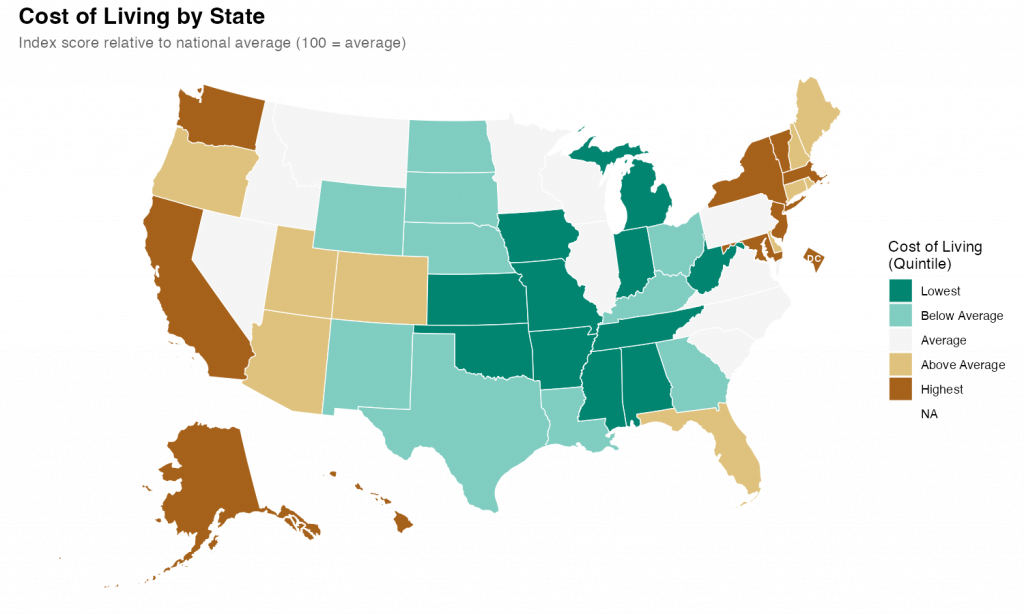
What I found was impressive. With a few prompts and a little back-and-forth, I was able to quickly produce a relatively attractive choropleth map showing state level cost of living data.

I started with a simple setup prompt just to see if everything was working.

> create a git repo for this project and add folders for code, data, and output

It was, and it did, also creating .gitkeep files in each of the empty directories and a .gitignore file. I noticed during the planning that I hadn’t specified that I’d be using R as my language, so I added some additional context so it could make the .gitignore more relevant.

> add commong R patterns to the .gitignore

It figured it out despite my typo.

Once that was all executed, it was time for the main prompt on the task. I’ve heard that the best way to talk to claude code is to just treat it like a experienced engineer. So that’s what I did

> Our goal is to create a state-level chloropleth map of the United States showing the relative cost of living for each state.  We will be using R as our language with the tidyverse library. For the map shape file we will use the usmap library. The data is in a csv file at data/cost_of_living.csv. Break the states into quintiles based on the cost_of_living score and pick an attractive diverging color scheme for plotting.  Make sure to use ggplot for the graph and to give the final version a title and meaningful legend labels.  Save the output and a .png to the output directory with dimensions of 10x6 inches.

I submitted that and sat back and watched it work. It took a couple minutes to grind through it and I noticed that at least once it tried to execute the code and got an error. But it recognized the error and corrected the code and reran without my intervention.

The results were fine and I could have stopped there, but I wanted to see how well it did with changes and edits. So, first, I asked it to change the color scheme. I told it exactly what palette I wanted.

> instead of the RdYlGn palette, use the diverging type pallete #1  

Again, it figured it out despite my typo. Looking at the code itself, It didn’t exactly follow my directions/expectations (I expected it to specify the palette by number; it instead figured out the palette by I meant and used the name). But, technically, it was exactly correct.

Finally I gave it a slightly hard challenge.

> It's hard in the map to see DC because it's so small.  Make it larger and move it slightly off the coast of Maryland        

This took a while for Code to think through and required a larger refactor of the existing code along with the additional sf code to move DC. Again, watching it worked, it seemed to fail a few times along the way. But it kept at it and ultimately succeeded.

The final map is below. I thinks its pretty good. It took me about an hour, which is probably about what it would have taken me to do by hand (I would have had to research how to move DC for a while). But hour was significant time on my end checking up on Claude as it went. If I hadn’t been learning myself, I’ve no doubt this would have been significantly quicker than I could do alone. Like I said at the top, I’m impressed.

Surfer Rosa

By Pixies (1988, #96)

So I know this album well even if I haven’t listen to it end-to-end in a decade or more.  And it’s great. I see why it rated inclusion in this list.  The whole thing flows together into a cohesive, amazing, whole.  Not that the Pixies ever had an album that didn’t sound like this, but still.  All and all an amazing album.

Harvest

By Neil Young (1972, #97)

This is an amazing album.  Not sure there’s a loser among the bunch and it’s fricken’ packed with timeless songs.  Heart of Gold. Old ManThe Needle and the Damage DoneWords (Between the Lines of Age).  These are amazing songs on an amazing album.  Kinda shocked this didn’t end up higher on the list, frankly.

« Older posts

© 2026 Overthinking it

Theme by Anders NorenUp ↑